A python script to turn a normal webcam into a sensor capable to detect some movement features and output them through NITH protocol
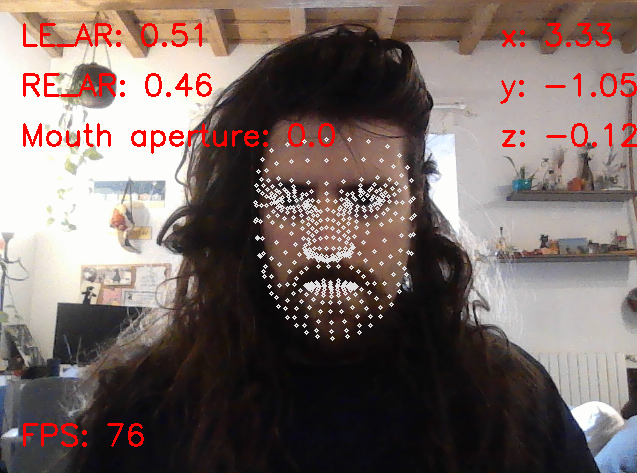
NITHwebcamWrapper is part of NITH, a framework for building software tools for accessibility for people with quadriplegic or other kind of motor disabilities which hinder hand movements. It's Python script which extracts facial movement features in real-time by analizing the video stream of a webcam. It's part of the NithSensors collection, and it's built to be used for interaction purposes.
The currently extracted facial movement features are:
- Head rotation (yaw and pitch)
- Opening of the left and right eyes
- Mouth opening
Detected features are relayed locally over IP "127.0.0.1" on UDP port 20100, using the standard NithSensors communication protocol (see NithSensors Readme) This allows applications designed to work with NithSensors to receive and incorporate these detections.
Landmarks extraction is provided by the MediaPipe library.
is built with Python, meaning you'll need Python installed on your computer to run it. If you're new to Python, follow this steps:
- Visit the official Python website.
- Download the latest version of Python for your operating system (Windows, macOS, Linux).
- Run the downloaded installer and follow the on-screen instructions. Make sure to check the box that says "Add Python X.X to PATH" during installation to make Python accessible from your command line or terminal.
For a more detailed guide, you can check out this beginner-friendly Python installation tutorial.
You can download NITHwebcamWrapper by cloning the repository from GitHub:
git clone https://github.com/LIMUNIMI/NITHwebcamWrapper.gitIt's recommended to create a virtual environment to keep the project dependencies isolated from your system Python installation. This prevents potential conflicts with other Python projects.
-
Create a virtual environment (optional but recommended):
python -m venv venv
-
Activate the virtual environment:
- On Windows:
venv\Scripts\activate
- On macOS/Linux:
source venv/bin/activate
- On Windows:
-
Install the required dependencies using the provided requirements.txt file:
pip install -r requirements.txt
This will install all necessary packages including OpenCV, NumPy, MediaPipe, and other dependencies required for computer vision operations, facial landmark extraction, and UDP communication.
Note: If you prefer to install dependencies manually instead of using requirements.txt, you can run:
pip install opencv-python numpy mediapipeTo run NITHwebcamWrapper, ensure you're in the NITHwebcamWrapper directory in your command line or terminal. Then execute:
python main.pyIf you're on Windows, you can alternatively simply run NITHwebcamWrapper.bat.
Make sure your webcam is connected and properly setup as NITHwebcamWrapper will immediately begin to capture and analyze facial movements.
NITHwebcamWrapper is licensed through a GNU GPL-v3 Free Open-Source software license. Feel free to contribute!
You can open an Issue for any request regarding this code, or contact me (the developer) directly via email at [email protected].
Thanks to one of my thesis students (@Ale-Gr), which contributed to this project with his thesis work. 🙏 Check out his code, which is a similar application which sends a similar set of features formatted using the OSC (Open Sound Control) protocol, provides a graphical user interface, a calibration system, and can be used to emulate the mouse cursor (for accessibility purposes).
The head rotation analysis function is based on a Python script provided by Nicolai Nielsen in a tutorial on YouTube. Thank you 🙏